
Create and Manage Producers
Create Producers and connect them to products to get quotes.
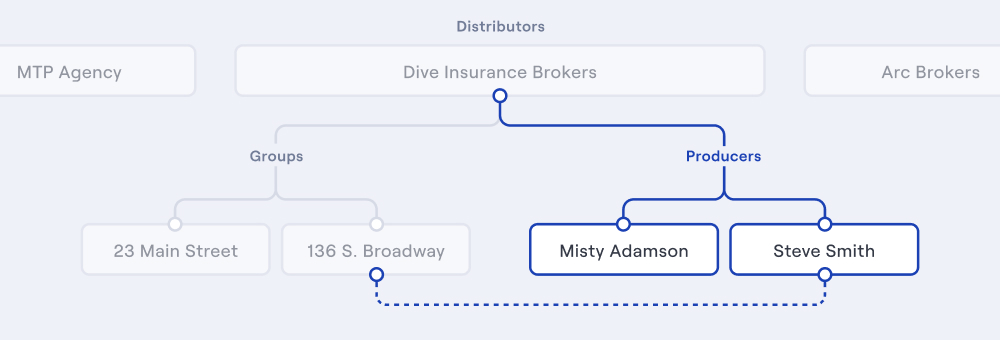
Each licensed agent on your platform is a producer, with the ability to submit applications for quotes for the products they have access to. Each producer belongs to a single distributor, and can belong to multiple groups.
You can create and manage a producer using the steps below, and then give them access to products by making connections.
Create a Producer
You can create a producer using POST /producers which requires a name, email, and a distributor via distributor_id. You can also include the following optional information when creating or updating a producer:
enabled: A flag to communicate if the producer is enabled or disabled. When not provided, it is set totrue. Whenenabled: falsethe producer’s connections will remain active, however the producer will not have access to the Herald API.external_id: An external value you can set to associate the producer with your internal id for tracking. When not provided, it is set tonull.groups: An array ofgroup_idsto associate a producer with a group. When not provided, it is set to an empty array[].
Creating a producer should look like the example below.
{
  "name": "Steven Smith",
  "email": "steven@logan-ins.com",
  "distributor_id": "dab8023b-7f9e-4146-9614-a3d922d359b0"
}{
"producer": {
"id": "497f6eca-6276-4993-bfeb-53cbbbba6f08",
"name": "Steven Smith",
"email": "steven@logan-ins.com",
"enabled": true,
"distributor": {
"id": "dab8023b-7f9e-4146-9614-a3d922d359b0",
"name": "Logan Insurance Group",
"domains": [
"logan-ins.com"
],
},
"external_id": null,
"groups": [],
"connections": []
}
}As shown above, the response includes the information above as well as:
- The
idfor the producer. - An array of
connections. Connections are the relationship between a producer and a product.
Note that when creating a new producer, connections will be an empty array []. As you make connections for a producer, they will appear in the response.
Connect Producers to Products
Once you’ve created a producer, you can connect them to products. You can give a producer access to products by making a connection to any product the producer's distributor has access to.
Get all Producers
You can get a list of all your producers using GET /producers. The response will include an array of all producers you have created. In the example above, we created a new producer. Let’s look at an example response assuming that you have already created a different producer in the past that belongs to a group and has a connection.
{
  "producers": [
    {
      "id": "497f6eca-6276-4993-bfeb-53cbbbba6f08",
      "name": "Steven Smith",
      "email": "steven@logan-ins.com",
      "enabled": true,
      "distributor": {
        "id": "dab8023b-7f9e-4146-9614-a3d922d359b0",
        "name": "Logan Insurance Group",
        "domains": [
          "logan-ins.com"
        ],
      },
      "external_id": null,
      "groups": [],
      "connections": []
    },
    {
      "id": "c0caf150-7730-11ed-a1eb-0242ac120002",
      "name": "Megan Stevens",
      "email": "megan@logan-ins.com",
      "enabled": true,
      "distributor": {
        "id": "dab8023b-7f9e-4146-9614-a3d922d359b0",
        "name": "Logan Insurance Group",
        "domains": [
          "logan-ins.com"
        ],
      },
      "external_id": null,
      "groups": [
         {
            "id": "497f6eca-6276-4993-bfeb-53cbbbba6f08",
            "type": "office",
            "value": {
               "line1": "476 Rodeo Drive",
               "line2": "Suite 23",
               "line3": null,
               "organization": "ACME Corporation",
               "city": "Hill Valley",
               "state": "CA",
               "postal_code": "95425",
               "country_code": "USA"
            }
         }
      ],
      "connections": [
         {
            "id": "cd6aaf68-7730-11ed-a1eb-0242ac120002",
            "product_id": "prd_0050_herald_cyber",
            "status": "active"
         }
      ]
    }
  ]
}
As you can see in the response above, the producer that has a connection and belongs to a group includes an array of objects for each concept.
- Each Group in the array contains the groups
id,type, andvalue - Each Connection in the array contains the
idandstatusfor the connection, and theproduct_idthat the producer is connected to.
Get and Update a Producer
Before updating a producer, you can get the details of an individual producer using GET /producers/{producer_id} which will provide the details for that producer.
If you need to update information for a producer, there are two methods to make the update using PATCH and PUT
Changing the distributor or group a producer belongs to could affect the
statusof a producers connection. If you are updating one of these for a producer, make sure the new distributor or group has access to the same products.
PATCH to update
You can update a producer using PATCH /producers/{producer_id} which will update information in the request. That can include name, email, enabled, distributor, external_id and/or groups. Let’s say you want to add the producer to a group and add an external_id, the request would look like this:
{
  "external_id": "PRD-77156",
  "groups": [
		"497f6eca-6276-4993-bfeb-53cbbbba6f08"
	]
}{
"producer": {
"id": "497f6eca-6276-4993-bfeb-53cbbbba6f08",
"name": "Steven Smith",
"email": "steven@logan-ins.com",
"enabled": true,
"distributor": {
"id": "dab8023b-7f9e-4146-9614-a3d922d359b0",
"name": "Logan Insurance Group",
"domains": [
"logan-ins.com"
],
},
"external_id": "PRD-77156",
"groups": [
{
"id": "497f6eca-6276-4993-bfeb-53cbbbba6f08",
"type": "office",
"value": {
"line1": "476 Rodeo Drive",
"line2": "Suite 23",
"line3": null,
"organization": "ACME Corporation",
"city": "Hill Valley",
"state": "CA",
"postal_code": "95425",
"country_code": "USA"
}
}
],
"connections": []
}
}PUT to update
You can also update a producer using PUT /producers/{producer_id} which updates all information in the request. The request should include information that you want to update and that you want to stay the same. If excluded, optional fields will be set to the defaults mentioned above. Let’s say you want to add an say you want to add an external_id.
First, check the details for the producer you want to update:
{
	"name": "Steven Smith",
  "email": "steven@logan-ins.com",
  "enabled": true,
  "distributor": {
       "id": "dab8023b-7f9e-4146-9614-a3d922d359b0",
       "name": "Logan Insurance Group",
       "domains": [
          "logan-ins.com"
       ],
    },
  "external_id": null,
  "groups": []
}
Then send the following request to add an external_id:
{
  "name": "Steven Smith",
  "email": "steven@logan-ins.com",
  "enabled": true,
  "distributor_id": "dab8023b-7f9e-4146-9614-a3d922d359b0",
  "external_id": "PRD-77156",
  "groups": []
}{
"producer": {
"id": "497f6eca-6276-4993-bfeb-53cbbbba6f08",
"name": "Steven Smith",
"email": "steven@logan-ins.com",
"enabled": true,
"distributor": {
"id": "dab8023b-7f9e-4146-9614-a3d922d359b0",
"name": "Logan Insurance Group",
"domains": [
"logan-ins.com"
],
},
"external_id": "PRD-77156",
"groups": [],
"connections": null
}
}