
Create a Connection
Create a connection to give a producer access to quote a product.
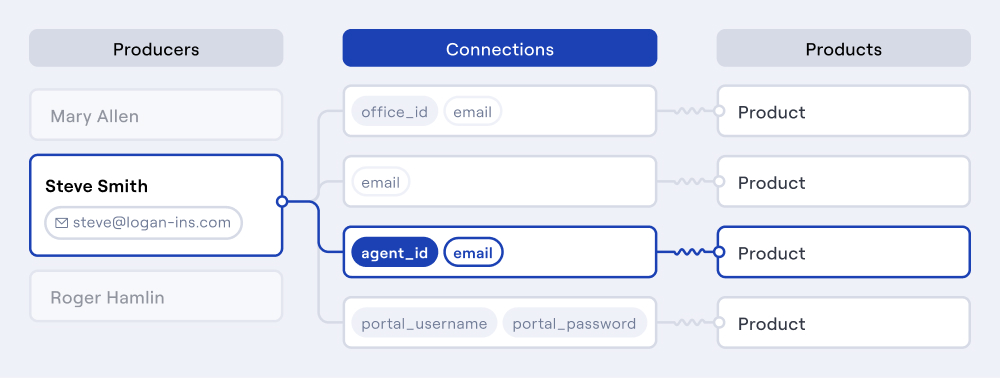
Creating a connection gives a producer the access to get quotes for a product via API. A connection is the relationship between an individual producer and an individual product, requiring any relevant auth_values to authenticate the identity and appointment of the producer.
The relevant auth_values to connect a producer to a given product are documented in the Producer Connection Appendix, or can be retrieved dynamically by creating a Connections Intent. Only some products require authentication values, since some products authenticate a producer using information stored in the producer object like the producer’s email address.
Each connection is given a status of either active or referred. If the connection has an active status, the producer is authenticated and able to get quotes for the product. A referred connection requires more information from the carrier or Herald's team, and should be resolved in less than 24 hours. If a producer attempts to submit an application to quote a product they are not connected to, or with a referred status, it will result in a 400.
Create a Connection
To make a connection, use POST /connections including the producer_id and product_id you want to connect. If the connection requires authentication values, include each value in the auth_values array. If authentication values are not required, you can either submit an empty array or remove auth_values all together.
Below are example requests for a connection that requires authentication values, and a connection that does not.
With Auth Values
{
  "producer_id": "497f6eca-6276-4993-bfeb-53cbbbba6f08",
  "product_id": "prd_0012_pigeon_general_liability",
  "auth_values": [
    {
      "auth_parameter_id": "ath_sn37_pigeon_username",
      "value": "Steve22"
    },
    {
      "auth_parameter_id": "ath_nid9_pigeon_password",
      "value": "p@$$woRd"
    }
  ]
}{
"connection": {
"producer_id": "497f6eca-6276-4993-bfeb-53cbbbba6f08",
"product_id": "prd_0012_pigeon_general_liability",
"id": "c69fee3b-acf7-463a-92a0-358a26135f61",
"status": "active",
"auth_values": [
{
"auth_parameter_id": "ath_sn37_pigeon_username",
"value": "Steve22"
},
{
"auth_parameter_id": "ath_nid9_pigeon_password",
"value": "p@$$woRd"
}
]
}
}No Auth Values
{
  "producer_id": "497f6eca-6276-4993-bfeb-53cbbbba6f08",
  "product_id": "prd_0010_herald_general_liability",
  "auth_values": []
}{
"connection": {
"producer_id": "497f6eca-6276-4993-bfeb-53cbbbba6f08",
"product_id": "prd_0010_herald_general_liability",
"id": "c69fee3b-acf7-463a-92a0-358a26135f61",
"status": "active",
"auth_values": []
}
}In both examples, the response includes the details you’ve submitted as well as an id and a status.
- The
idcan be used to get the details of the connection or update the connection. - The
statusof a connection communicates if the producer is able to get quotes for the product.
Note that when a connection requires authentication values, all values must be submitted in order to make the connection.
Connection Status
Each connection you create is given a status of active or referred.
- A connection with an
activestatus communicates that the producer is connected to the product and ready to make submissions. - A connection with a
referredstatus means a review is needed, and this was sent to Herald's team to complete the connection. It’s important to note, a referred status does not mean more information is needed from you.
In many cases, a connection will have an active status immediately after you’ve created it. This means you can create a producer, connect them to a product, and give them the ability to submit an application for a quote in a matter of seconds.
Creating a connection that results in a referred status is most likely when you connect to a product for the first time. As explained in our connections doc, a carrier may require their own form of authentication to confirm the identity and appointment of a producer, and Herald collects these representations as auth_values. Common examples of these forms of authentication include a producers username and password to log into a carriers portal.
In some cases, a carrier may require representation of entities above the producer, such as an api_key for your platform to access their API. These values may represent your platform or an individual distributor, and are typically only known by the carrier rather than a value you are familiar with. In these cases Herald submits those values behind-the-scenes when you integrate with a product for the first time, and they are reused for all subsequent connections you make in the future.
If you receive a
referredstatus, assume that Herald has been notified and is taking care of it! UseGET/connections/{connection_id}to see if a connection status has been updated fromreferredtoactive.
Get a Producer's Connections
Once you’ve created a connection, the details of the connection will appear in the connections array of each producer object. You can see an individual producer's connections using GET /producers/{producer_id}. Read more in our guide to managing producers.
Following the example above, the newly created connection would appear in the producer object like this:
{
  "producer": {
  "id": "497f6eca-6276-4993-bfeb-53cbbbba6f08",
  "name": "Steven Smith",
  "email": "steven@logan-ins.com",
  "distributor": {
     "id": "dab8023b-7f9e-4146-9614-a3d922d359b0",
     "name": "Logan Insurance Group",
     "domains": [
        "logan-ins.com"
     ],
  },
  "external_id": null,
  "groups": null,
  "connections": [
     {
        "id": "c69fee3b-acf7-463a-92a0-358a26135f61",
        "product_id": "prd_0050_herald_cyber",
        "status": "active"
     }
   ]
}
Update a Connection
You can update a connection using PUT /connections/{connection_id}, which allows you to update the value of an auth_value. You cannot update the producer_id or product_id for a connection, create a new connection instead.
This endpoint is useful if a producer updates information such as their username or password for a carrier's portal. Keeping this information up to date is the best way to prevent errors when making submissions.
When you submit an application,
auth_valuesare used to authenticate with the carriers API. Updating a value with inaccurate information may result in an error when making a submission.
Let’s look at an example where we need to update the username and password for this connection.
{
  "producer_id": "497f6eca-6276-4993-bfeb-53cbbbba6f08",
  "product_id": "prd_0012_pigeon_general_liability",
  "auth_values": [
    {
      "auth_parameter_id": "ath_sn37_pigeon_username",
      "value": "StevenSmith22"
    },
    {
      "auth_parameter_id": "ath_nid9_pigeon_password",
      "value": "m0r3$3cuRe"
    }
  ]
}{
"connection": {
"producer_id": "497f6eca-6276-4993-bfeb-53cbbbba6f08",
"product_id": "prd_0012_pigeon_general_liability",
"id": "c69fee3b-acf7-463a-92a0-358a26135f61",
"status": "active",
"auth_values": [
{
"auth_parameter_id": "ath_sn37_pigeon_username",
"value": "StevenSmith22"
},
{
"auth_parameter_id": "ath_nid9_pigeon_password",
"value": "m0r3$3cuRe"
}
]
}
}Get a Connection
You can get the details of an individual connection using GET /connections/{connection_id}. Getting the details of a connection is useful when checking for an updated status of a connection.
{
  "connection": {
    "producer_id": "497f6eca-6276-4993-bfeb-53cbbbba6f08",
    "product_id": "prd_0012_pigeon_general_liability",
    "id": "c69fee3b-acf7-463a-92a0-358a26135f61",
    "status": "active",
    "auth_values": [
      {
        "auth_parameter_id": "ath_sn37_pigeon_username",
        "value": "StevenSmith22"
      },
      {
        "auth_parameter_id": "ath_nid9_pigeon_password",
        "value": "m0r3$3cuRe"
      }
    ]
  }
}