
Quote Exits
Quote exits communicate that an application will result in a decline prior to submitting the application.
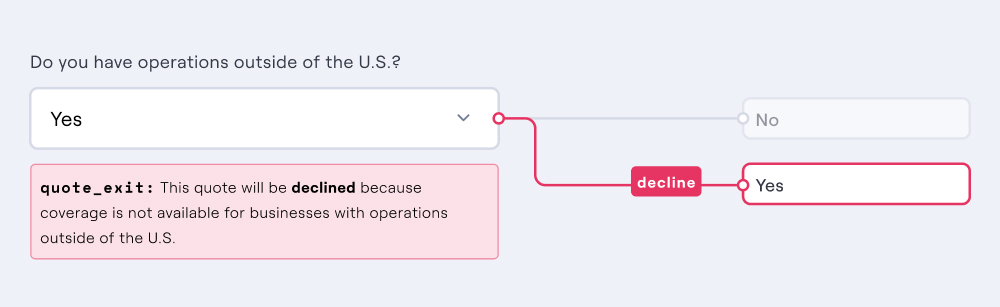
When requesting a quote, an institution will review the application to determine if the applicant is eligible for coverage. An institution could determine that an applicant is ineligible for a number of reasons, such as the applicants claims history or exposure to certain risks.
As you can imagine, many of these decisions are pre-determined. For example, an institution may have decided that they will never offer coverage to applicants based in Alaska. In this case, once an applicant has communicated that they are based in Alaska, filling out the rest of the application can seem like a waste.
Quote Exits at Herald
If Herald is aware of these decisions, we communicate them via quote_exits in the application. Essentially, quote exits communicate that based on values you have already submitted, Herald can confidently say that the quote is going to return in a negative status of either declined or unsupported.
In the example above, we talked through a product that is not available in Alaska. Let’s say you are filling out an application for this products, and it has 20 required questions (parameters). If the very first question you submit is the applicants home state, which is Alaska, you will receive a quote exit. Below is an example to show how this would be communicating after using PUT /applications:
{
  "quote_exits": [
    {
      "product_id": "prd_0010_herald_general_liability",
      "status": "declined",
      "status_details": [
        {
          "status_text": {
            "applicant_facing_text": "This quote was declined because coverage is not available in Alaska.",
            "agent_facing_text": "This quote was declined because coverage is not available in Alaska."
          },
          "source": "herald"
        }
      ]
    }
  ],
  "application": {
   .....
   }
As you can see, the quote exit communicates that for the product prd_0010_herald_general_liability, the status is going to be declined. The reason for this pre-determined decline is communicated in the status_text, in both an applicant and agent facing version. In this example, the reason is: “This quote was declined because coverage is not available in Alaska.”
An application can result in multiple quote exits, for multiple products or for the same product. For example, an applicant could be declined for both their state and their profession, and this could be consistent across multiple products in the application.
After a Quote Exit
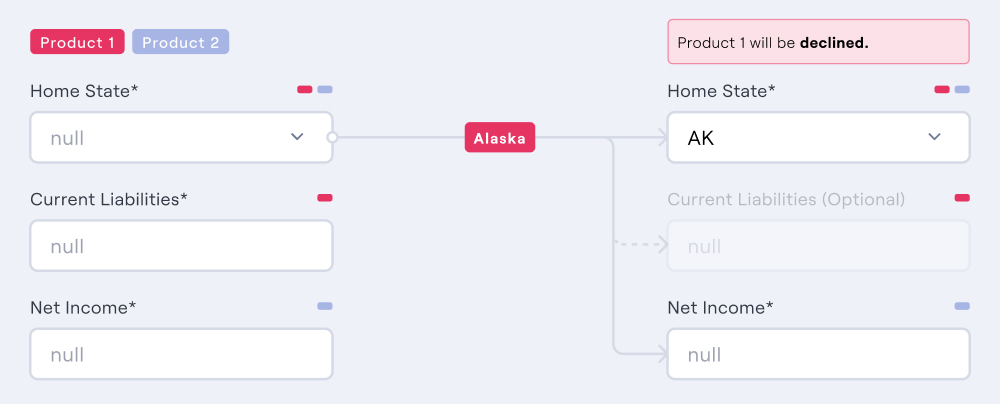
Once an application has received a quote exit, parameters that are relevant for the exited product become optional. This allows applicants to save time, only answering the remaining questions that are relevant for non-exited products. This is communicated using the required_for property.
Using the example above, let’s say you have an application for 2 products: prd_1 and prd_2. The product that will receive a quote exit for an applicant in Alaska is prd_1. Prior to updating the application, submitting the value for the applicants state, the parameters in the application would look like this:
{
  "application": {
    "risk_values": [
      {
        "risk_parameter_id": "rsk_1rdc_home_state",
        "value": null,
        "relevant_products": [ "prd_1", "prd_2" ],
        "required_for": [ "quote" ],
      },
      {
        "risk_parameter_id": "rsk_t0a4_current_liabilities",
        "value": null,
        "relevant_products": [ "prd_1"],
        "required_for": [ "quote" ],
      },
			{
        "risk_parameter_id": "rsk_0bi6_net_income",
        "value": null,
        "relevant_products": [ "prd_2"],
        "required_for": [ "quote" ],
      },
    ]
  }
}
In the example above, you can see 3 total parameters, all of which are required_for: quote.
rsk_1rdc_home_stateis relevant for both productsrsk_t0a4_current_liabilitiesis only relevant for Product 1 (prd_1)rsk_0bi6_net_incomeis only relevant for Product 2 (prd_2)
Once you submit the value of AK for home state, the application will contain a quote exit for Product 1. Since it has been determined that the applicant will receive a decline for Product 1, parameters for that product are now optional:
{
  "application": {
    "risk_values": [
      {
        "risk_parameter_id": "rsk_1rdc_home_state",
        "value": "AK",
        "relevant_products": [ "prd_1", "prd_2" ],
        "required_for": [ "quote" ],
      },
      {
        "risk_parameter_id": "rsk_t0a4_current_liabilities",
        "value": null,
        "relevant_products": [ "prd_1"],
        "required_for": [  ],
      },
      {
        "risk_parameter_id": "rsk_0bi6_net_income",
        "value": null,
        "relevant_products": [ "prd_2"],
        "required_for": [ "quote" ],
      },
    ]
  }
}
In the response above, after receiving the quote exit:
rsk_1rdc_home_stateis still required for quote, because it is relevant for both products.rsk_t0a4_current_liabilitiesis no longer required, because it is only relevant for product 1 which is going to bedeclined.rsk_0bi6_net_incomeis still required for quote, because it is relevant for product 2.
You can choose to hide these optional values, or continue to show them while communicating that even after submitting values, the applicant is going to be declined. This way, the applicant won’t waste time answering additional questions when the quote status has already been determined!
To learn more about quote exits, please reach out to our team at hello@heraldapi.com.